Tabs
Tabs present custom content inside a new Tab of an existing Tabbed Area section within the Rancher UI.
Tabs are added to Rancher via the addTab method.
addTab
(From Rancher version v2.7.2)
This method adds a tab to the UI.
Method:
plugin.addTab(where: String, when: LocationConfig, options: Object);
Arguments
where string parameter admissable values for this method:
| Key | Type | Rancher Version | Description |
|---|---|---|---|
TabLocation.RESOURCE_SHOW_CONFIGURATION | String | v2.12.6, v2.13.2, v2.14.0 | Location for a Tab on a Resource Show Configuration |
TabLocation.RESOURCE_CREATE_PAGE | String | v2.12.6, v2.13.2, v2.14.0 | Location for a Tab on a Resource Create page |
TabLocation.RESOURCE_EDIT_PAGE | String | v2.12.6, v2.13.2, v2.14.0 | Location for a Tab on a Resource Edit page |
TabLocation.RESOURCE_DETAIL_PAGE | String | v2.12.6, v2.13.2, v2.14.0 | Location for a Tab on a Resource Detail page |
TabLocation.CLUSTER_CREATE_RKE2 | String | v2.13.0 | Location for a Tab on the Cluster Configuration area in Cluster Provisioning |
TabLocation.OTHER | String | v2.12.6, v2.13.2, v2.14.0 | Other Tab locations different than the ones specified above in order to cover different scenarios. Can be further specified with the appropriate LocationConfig params. |
TabLocation.RESOURCE_DETAIL | String | v2.7.2 - deprecated from v2.14.0 | Location for a Tab on a Resource Detail page |
when Object admissible values:
LocationConfig as described above for the LocationConfig object.
TabLocation.RESOURCE_SHOW_CONFIGURATION options
(From Rancher versions v2.12.6, v2.13.2, v2.14.0)
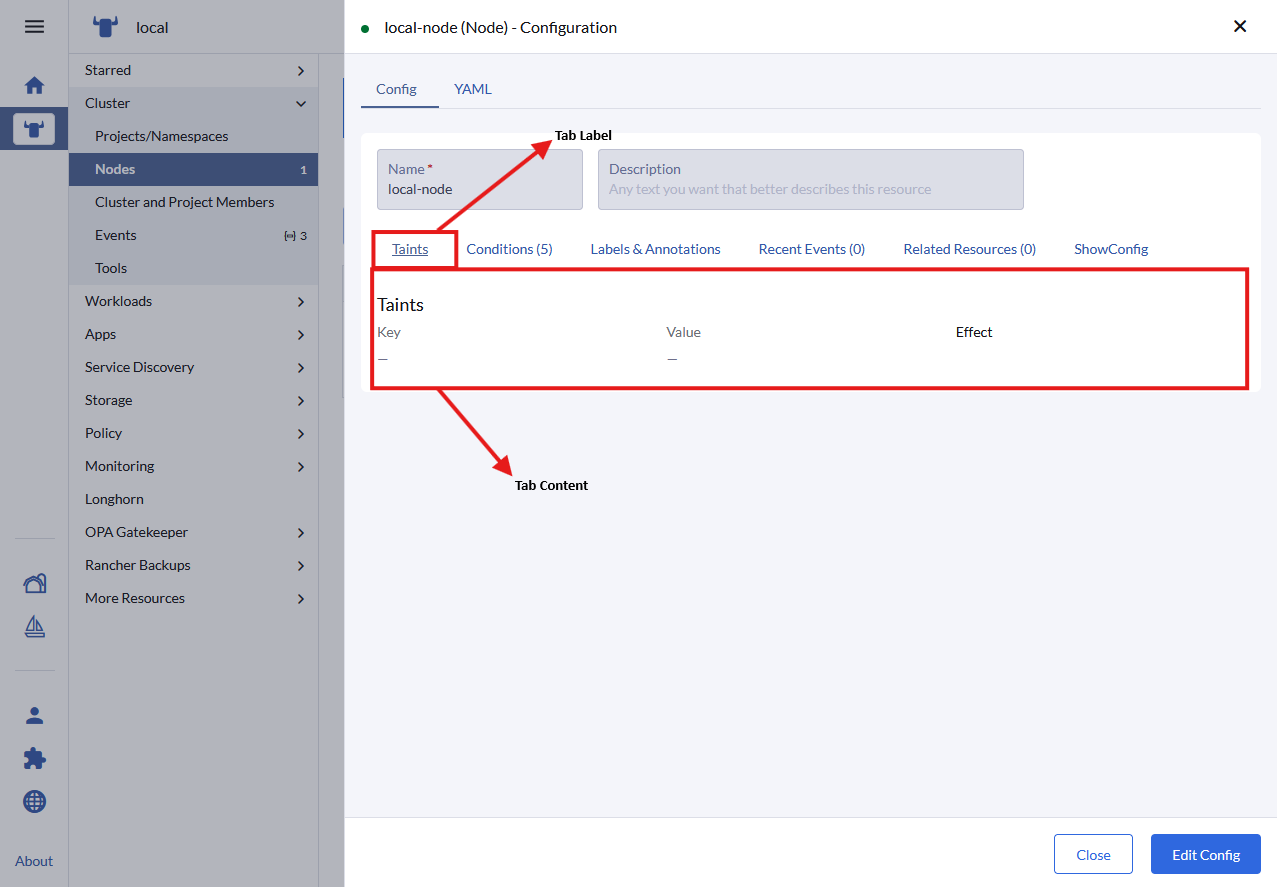
options config object. Admissible parameters for the options with 'TabLocation.RESOURCE_SHOW_CONFIGURATION' are:
| Key | Type | Description |
|---|---|---|
name | String | Query param name used in url when tab is active/clicked |
label | String | Text for the tab label |
labelKey | String | Same as "label" but allows for translation. Will supersede "label" |
weight | Int | Defines the order on which the tab is displayed in relation to other tabs in the component |
showHeader | Boolean | Whether the tab header is displayed or not |
tooltip | String | Tooltip message (on tab header) |
component | Function | Component to be rendered as content on the tab |
Usage example:
plugin.addTab(
  TabLocation.RESOURCE_SHOW_CONFIGURATION,
  { resource: ['pod'] },
  {
    name:       'some-name',
    labelKey:   'plugin-examples.tab-label',
    label:      'some-label',
    weight:     -5,
    showHeader: true,
    tooltip:    'this is a tooltip message',
    component:  () => import('./MyTabComponent.vue')
  }
);
TabLocation.RESOURCE_CREATE_PAGE options
(From Rancher versions v2.12.6, v2.13.2, v2.14.0)
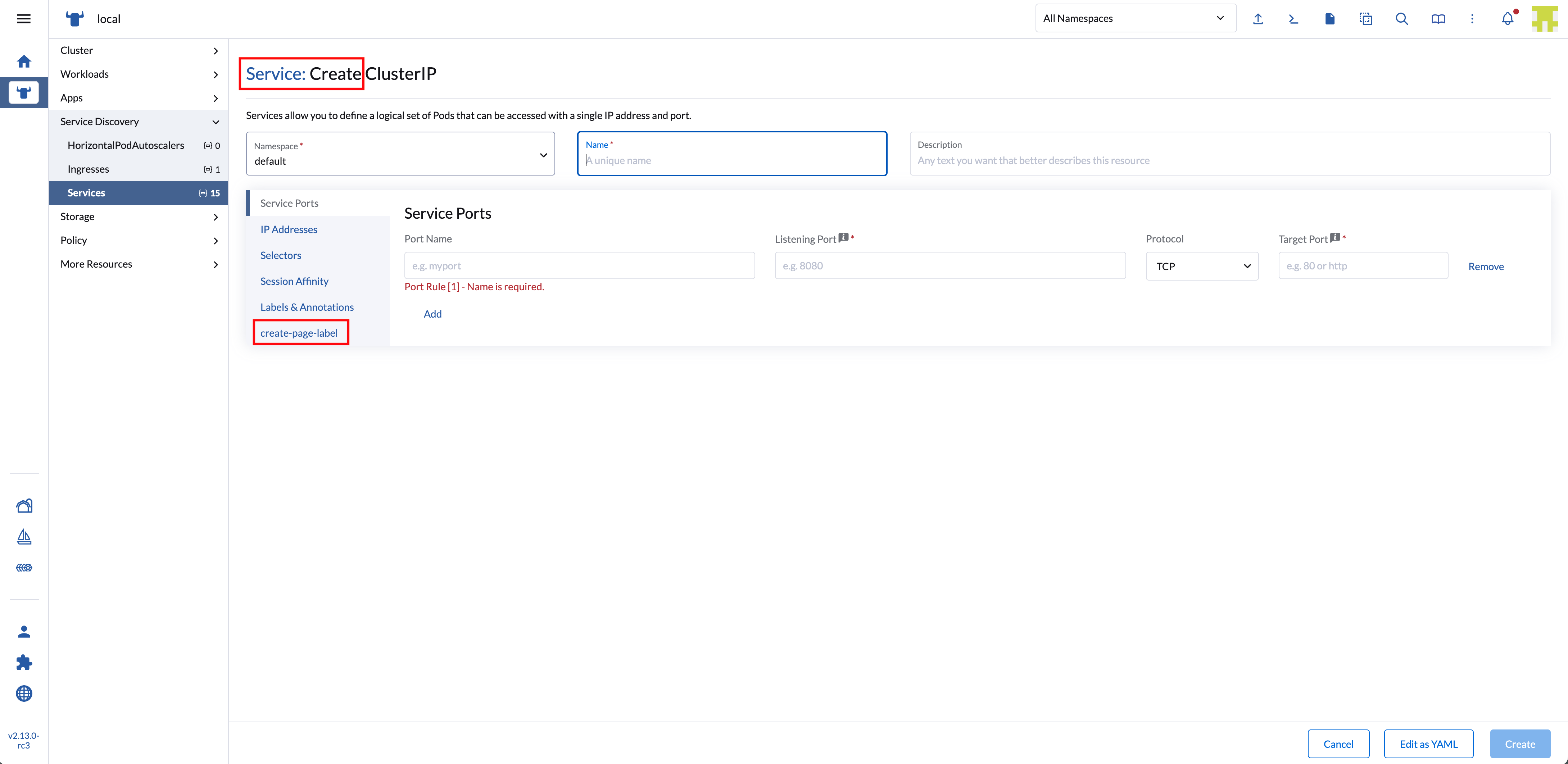
options config object. Admissible parameters for the options with 'TabLocation.RESOURCE_CREATE_PAGE' are:
| Key | Type | Description |
|---|---|---|
name | String | Query param name used in url when tab is active/clicked |
label | String | Text for the tab label |
labelKey | String | Same as "label" but allows for translation. Will supersede "label" |
weight | Int | Defines the order on which the tab is displayed in relation to other tabs in the component |
showHeader | Boolean | Whether the tab header is displayed or not |
tooltip | String | Tooltip message (on tab header) |
component | Function | Component to be rendered as content on the tab |
Usage example:
plugin.addTab(
  TabLocation.RESOURCE_CREATE_PAGE,
  { resource: ['pod'] },
  {
    name:       'some-name',
    labelKey:   'plugin-examples.tab-label',
    label:      'some-label',
    weight:     -5,
    showHeader: true,
    tooltip:    'this is a tooltip message',
    component:  () => import('./MyTabComponent.vue')
  }
);
TabLocation.RESOURCE_EDIT_PAGE options
(From Rancher versions v2.12.6, v2.13.2, v2.14.0)
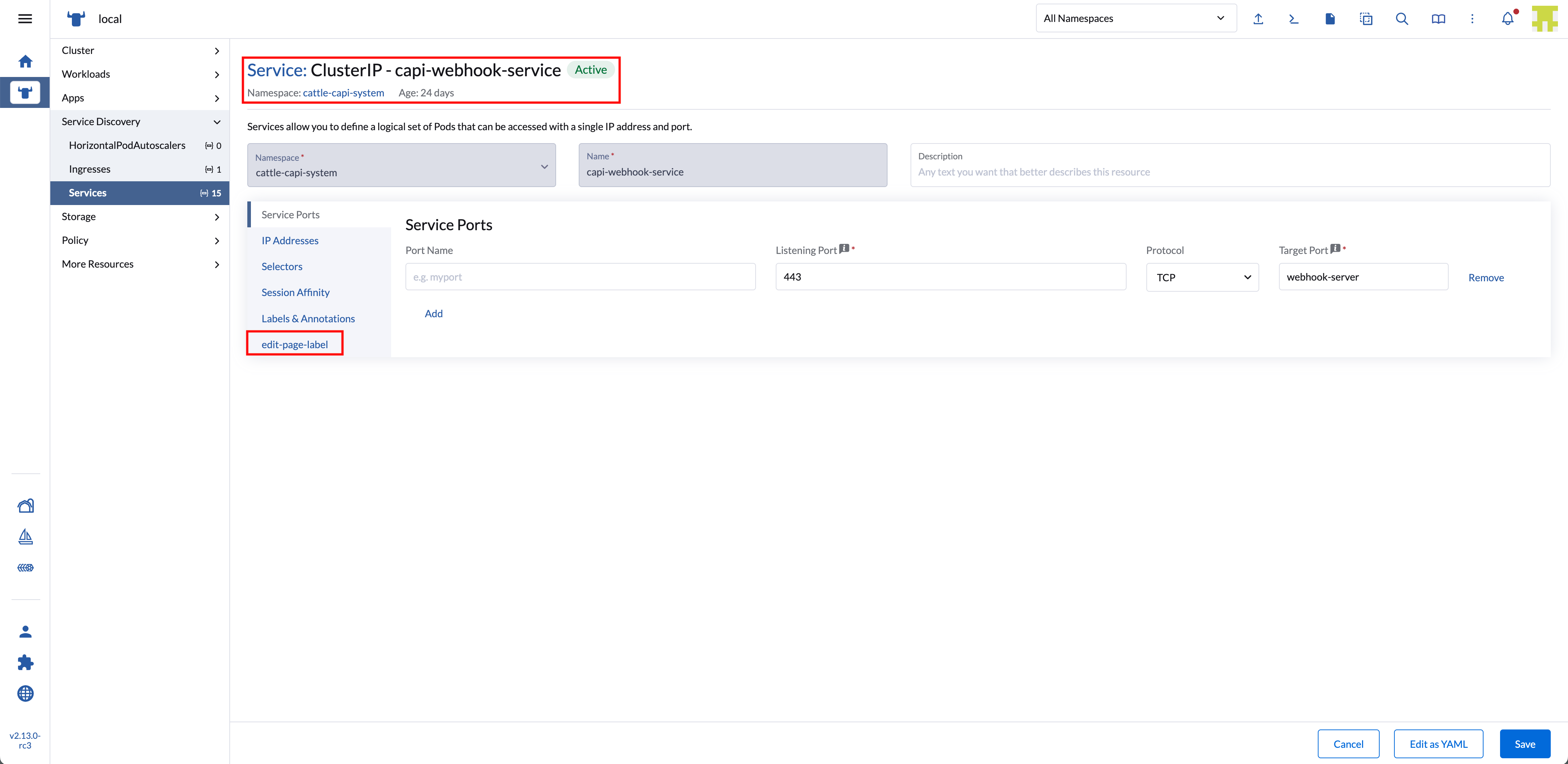
options config object. Admissible parameters for the options with 'TabLocation.RESOURCE_EDIT_PAGE' are:
| Key | Type | Description |
|---|---|---|
name | String | Query param name used in url when tab is active/clicked |
label | String | Text for the tab label |
labelKey | String | Same as "label" but allows for translation. Will supersede "label" |
weight | Int | Defines the order on which the tab is displayed in relation to other tabs in the component |
showHeader | Boolean | Whether the tab header is displayed or not |
tooltip | String | Tooltip message (on tab header) |
component | Function | Component to be rendered as content on the tab |
Usage example:
plugin.addTab(
  TabLocation.RESOURCE_EDIT_PAGE,
  { resource: ['pod'] },
  {
    name:       'some-name',
    labelKey:   'plugin-examples.tab-label',
    label:      'some-label',
    weight:     -5,
    showHeader: true,
    tooltip:    'this is a tooltip message',
    component:  () => import('./MyTabComponent.vue')
  }
);
TabLocation.RESOURCE_DETAIL_PAGE options
(From Rancher versions v2.12.6, v2.13.2, v2.14.0)
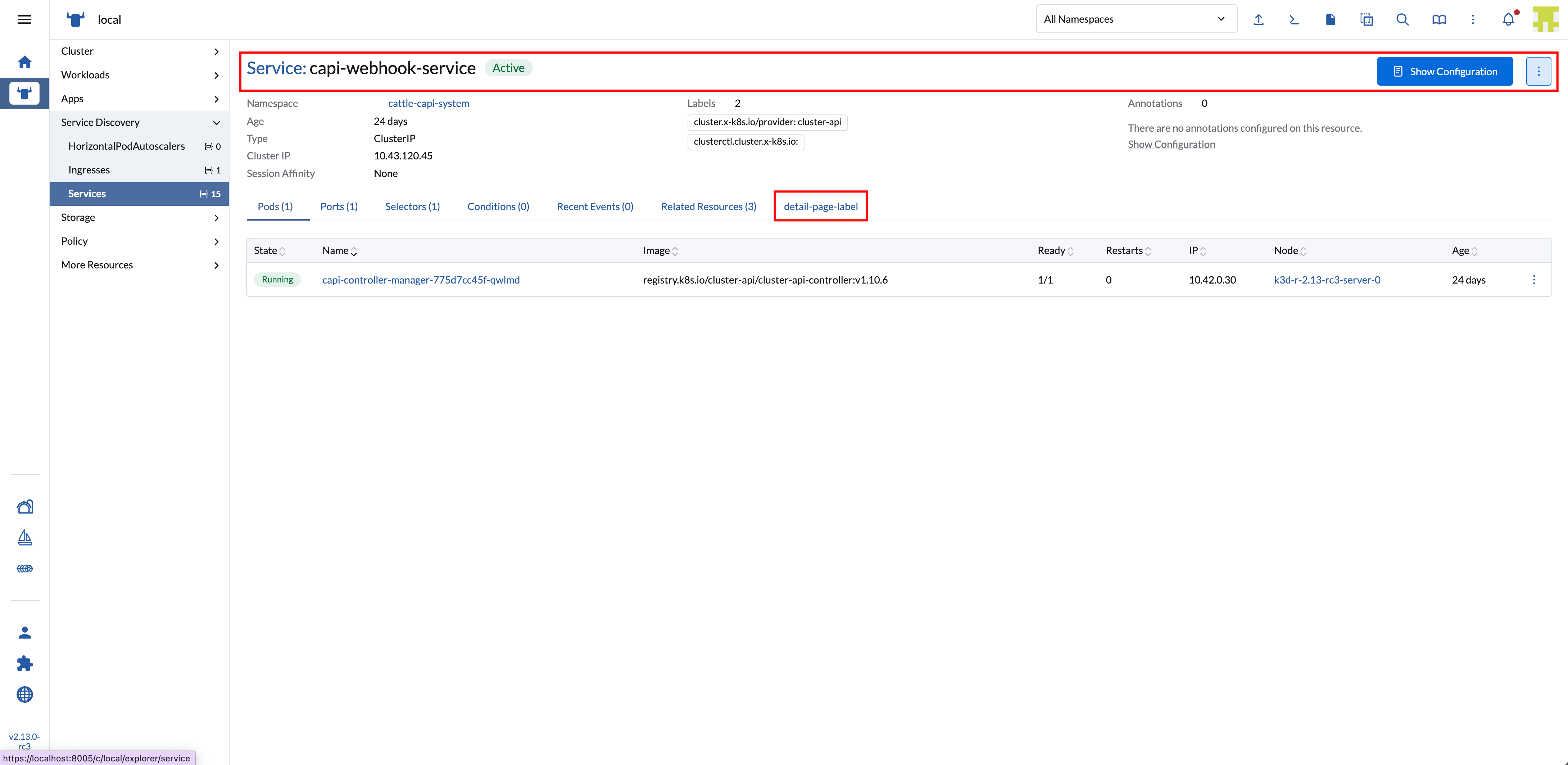
options config object. Admissible parameters for the options with 'TabLocation.RESOURCE_DETAIL_PAGE' are:
| Key | Type | Description |
|---|---|---|
name | String | Query param name used in url when tab is active/clicked |
label | String | Text for the tab label |
labelKey | String | Same as "label" but allows for translation. Will supersede "label" |
weight | Int | Defines the order on which the tab is displayed in relation to other tabs in the component |
showHeader | Boolean | Whether the tab header is displayed or not |
tooltip | String | Tooltip message (on tab header) |
component | Function | Component to be rendered as content on the tab |
Usage example:
plugin.addTab(
  TabLocation.RESOURCE_DETAIL_PAGE,
  { resource: ['pod'] },
  {
    name:       'some-name',
    labelKey:   'plugin-examples.tab-label',
    label:      'some-label',
    weight:     -5,
    showHeader: true,
    tooltip:    'this is a tooltip message',
    component:  () => import('./MyTabComponent.vue')
  }
);
TabLocation.CLUSTER_CREATE_RKE2 options
(From Rancher version v2.13.0)
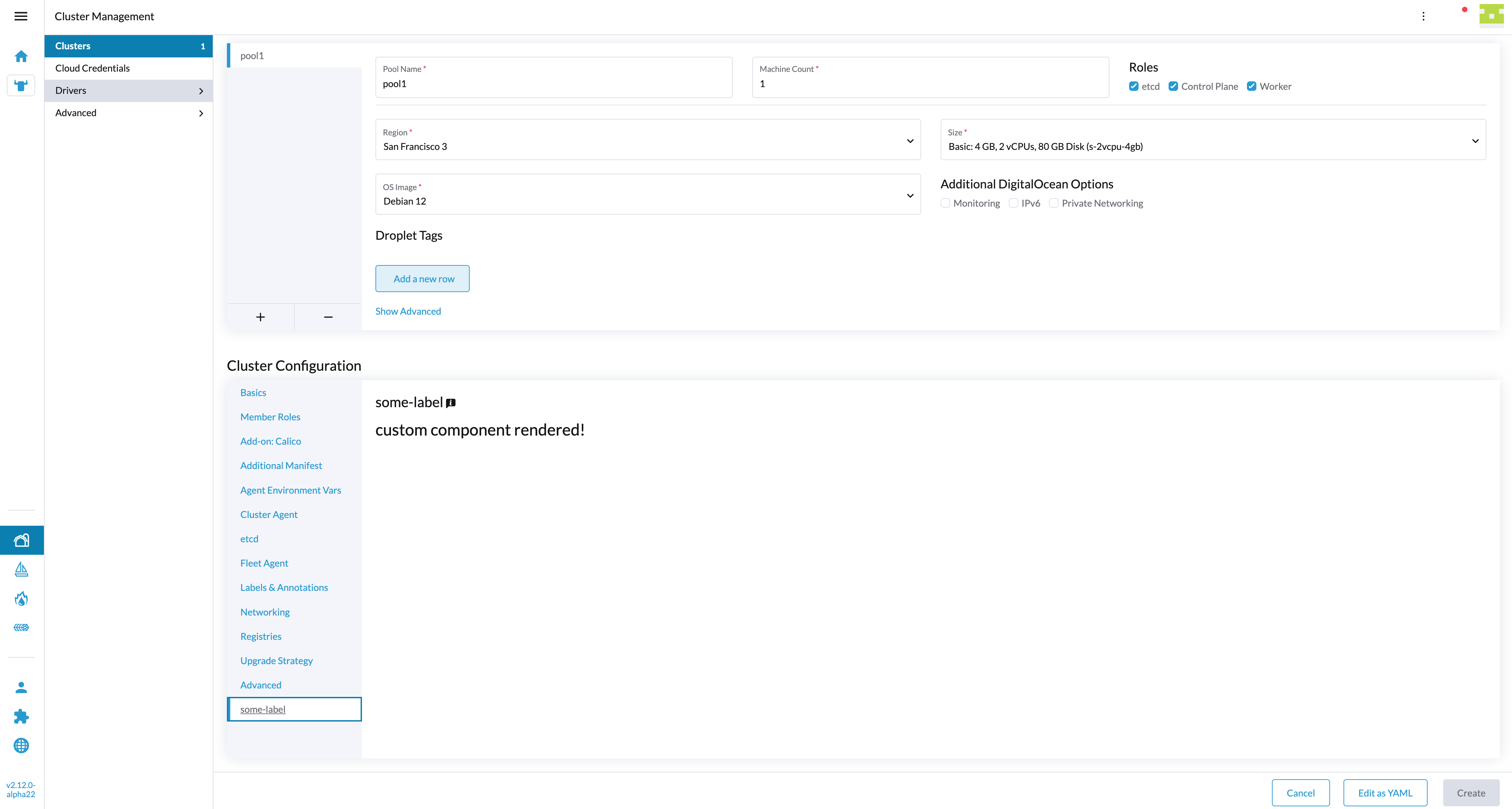
NOTE: this tab will be added in the CREATE cluster interface, Cluster Configuration. If you want to target a specific provider and rke type use the
queryParamin the location config. Ex:queryParam: { type: 'digitalocean', rkeType: 'rke2' }
options config object. Admissable parameters for the options with 'TabLocation.CLUSTER_CREATE_RKE2' are:
| Key | Type | Description |
|---|---|---|
name | String | Query param name used in url when tab is active/clicked |
label | String | Text for the tab label |
labelKey | String | Same as "label" but allows for translation. Will supersede "label" |
weight | Int | Defines the order on which the tab is displayed in relation to other tabs in the component |
showHeader | Boolean | Whether the tab header is displayed or not |
tooltip | String | Tooltip message (on tab header) |
component | Function | Component to be rendered as content on the tab |
Usage example:
plugin.addTab(
  TabLocation.CLUSTER_CREATE_RKE2,
  {
    resource:   ['provisioning.cattle.io.cluster'],
    queryParam: { type: 'digitalocean', rkeType: 'rke2' }
  },
  {
    name:       'some-name',
    labelKey:   'plugin-examples.tab-label',
    label:      'some-label',
    weight:     -5,
    showHeader: true,
    tooltip:    'this is a tooltip message',
    component:  () => import('./MyTabComponent.vue')
  }
);
TabLocation.OTHER options
(From Rancher versions v2.12.6, v2.13.2, v2.14.0)
options config object. Admissible parameters for the options with 'TabLocation.OTHER' are:
| Key | Type | Description |
|---|---|---|
name | String | Query param name used in url when tab is active/clicked |
label | String | Text for the tab label |
labelKey | String | Same as "label" but allows for translation. Will supersede "label" |
weight | Int | Defines the order on which the tab is displayed in relation to other tabs in the component |
showHeader | Boolean | Whether the tab header is displayed or not |
tooltip | String | Tooltip message (on tab header) |
component | Function | Component to be rendered as content on the tab |
Usage example:
plugin.addTab(
  TabLocation.OTHER,
  { resource: ['pod'] },
  {
    name:       'some-name',
    labelKey:   'plugin-examples.tab-label',
    label:      'some-label',
    weight:     -5,
    showHeader: true,
    tooltip:    'this is a tooltip message',
    component:  () => import('./MyTabComponent.vue')
  }
);
TabLocation.RESOURCE_DETAIL options
(From Rancher version v2.7.2)
deprecated from Rancher version 2.14.0 and onwards - use TabLocation.OTHER
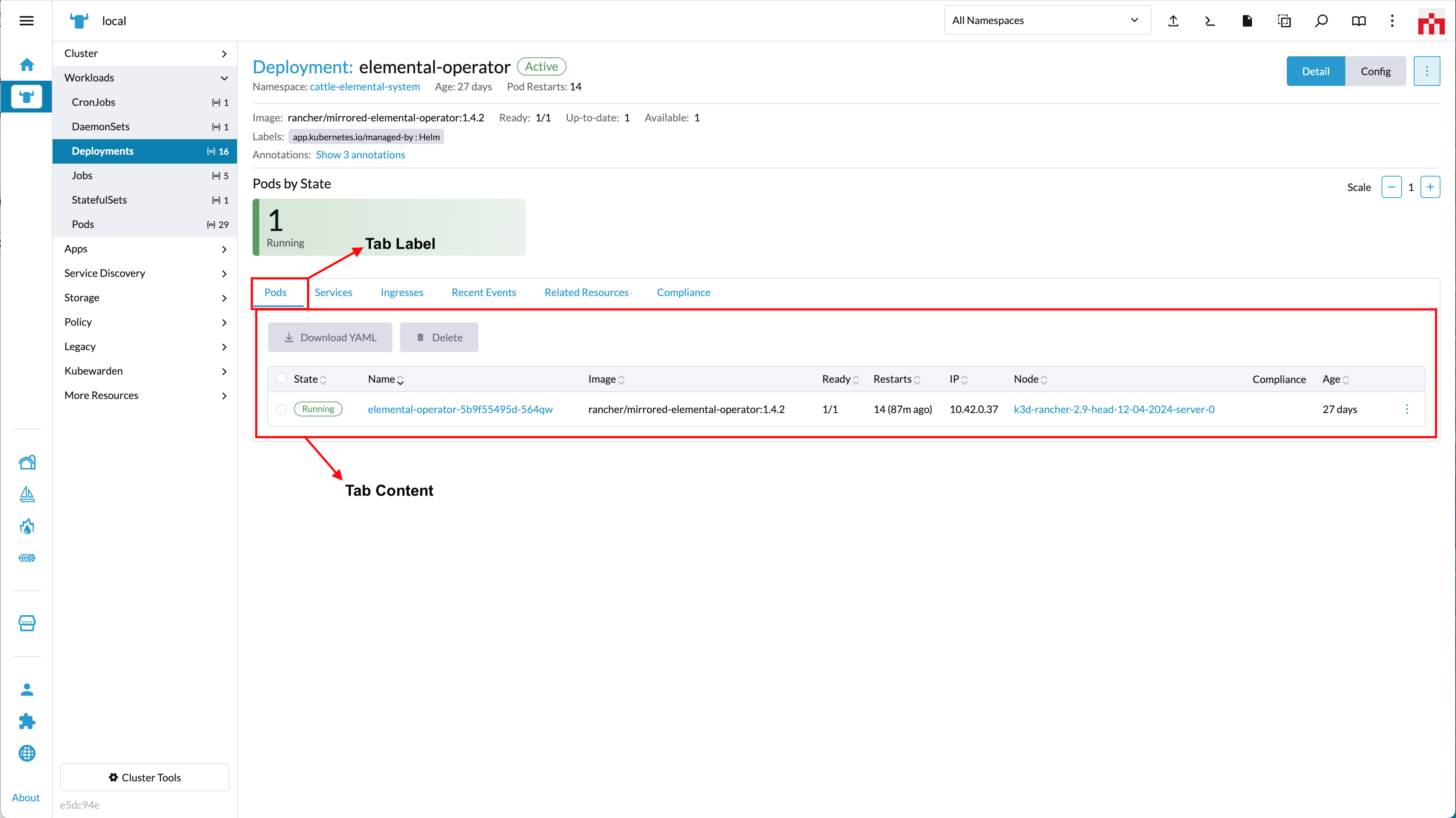
options config object. Admissible parameters for the options with 'TabLocation.RESOURCE_DETAIL' are:
| Key | Type | Description |
|---|---|---|
name | String | Query param name used in url when tab is active/clicked |
label | String | Text for the tab label |
labelKey | String | Same as "label" but allows for translation. Will supersede "label" |
weight | Int | Defines the order on which the tab is displayed in relation to other tabs in the component |
showHeader | Boolean | Whether the tab header is displayed or not |
tooltip | String | Tooltip message (on tab header) |
component | Function | Component to be rendered as content on the tab |
Usage example:
plugin.addTab(
  TabLocation.RESOURCE_DETAIL,
  { resource: ['pod'] },
  {
    name:       'some-name',
    labelKey:   'plugin-examples.tab-label',
    label:      'some-label',
    weight:     -5,
    showHeader: true,
    tooltip:    'this is a tooltip message',
    component:  () => import('./MyTabComponent.vue')
  }
);