Cluster Provisioning
The UI provides a number of ways to customize the processes of creating, importing, and editing clusters. This includes
- Adding additional Cluster Provisioner types
- Customizing or replacing components used in the create process
- Adding tabs
- Adding Hooks to the processes that persist cluster resources
- Performing overrides that replace the process to persist cluster resources
Custom Cluster Provisioner
New cluster provisioners can be added that can tailor the create/edit experience for their own needs.
Provisioner Class
To customize the process of creating or editing these resources the extension should register a provisioner class which implements the IClusterProvisioner interface.
plugin.register('provisioner', 'my-provisioner', ExampleProvisioner);
Note that
registerallows us to register an arbitrary extension and we introduce the typeprovisioner.
Below is outline for the functionality the class provides, for detail about the IClusterProvisioner interface see the inline documentation.
The class provides a way to...
- show a card for the new cluster type for the user to choose when selecting a provider
- handle custom machine configs that haven't necessarily been provided by the usual node driver way
- hooks to extend/override the cluster save process. Either..
- Override all of the cluster save process
- Extend/Override parts of the cluster save process. This allows a lot of the boilerplate code to manage addons, member bindings, etc to run
- run code before the cluster resource is saved
- replace the code that saves the core cluster
- run code after the cluster resource is saved
- show a custom label for the provider of the custom cluster
- This is done by setting the
ui.rancher/providerannotation in the cluster - It's used in the UI whenever showing the cluster's provider
- This is done by setting the
- show custom tabs on the Detail page of the custom cluster
To make API calls from the UI to a third-party domain, use the shell.proxy API (this.$shell.proxy). It routes requests through Rancher's server-side /meta/proxy endpoint, avoiding browser CORS restrictions and keeping cloud credentials out of the browser.
Before making requests, ensure the target hostname is registered on the proxy allow-list via a ProxyEndpoint CR:
const CR_NAME = 'my-extension-endpoints';


const exists = await this.$shell.proxy.hasProxyEndpoint(CR_NAME);

if (!exists) {
  await this.$shell.proxy.allowDomains(['api.example.com'], CR_NAME);
}
Then make requests using proxy.request():
const result = await this.$shell.proxy.request({
  url:            new URL('https://api.example.com/v1/regions'),
  authentication: {
    id:            myCloudCredentialId,
    authSigner:    'bearer',
    passwordField: 'token',
  },
});
See the Making API Calls page for the full API reference.
Custom Components and Models
Rancher provides mechanisms to overwrite or create new components. You can learn how to create custom cloud credential or machine configuration components in this documentation.
Resources
Creating a cluster revolves around the provisioning and management cluster resources. All node driver based clusters are provisioned using provisioning.cattle.io.cluster object, while all kontainer driver and hosted provider based clusters currently need to be provisioned using management.cattle.io.cluster object. Both types of cluster will load as a provisioning.cattle.io.cluster resource, but additional steps will be required for the ones using management.cattle.io.cluster.
Provisioning Cluster
The provisioning.cattle.io.cluster contains all the details of the cluster, aside from the machine configuration.
In the UI it is an instance of the provisioning.cattle.io.cluster.js class, which has lots of great helper functions, most importantly save, which extensions are able to extend and overwrite in their models.
When provisioning or editing a cluster, provisioning.cattle.io.cluster resource will be available as this.value.
For a RKE2/node driver cluster, the machine configuration is also required:
- The machine configuration defines how the individual nodes within a node pool will be provisioned. For instance which region and size they may be
- These normally have an type of
rke-machine-config.cattle.io.<provider name>config, which matches the id of it's schema object
Management Cluster
There is one management.cattle.io.cluster cluster resource for every downstream cluster managed by Rancher.
Currently, it is used to create or modify all hosted and imported clusters. To access it, you can do
//On creation
 this.normanCluster = await store.dispatch('rancher/create', { type: NORMAN.CLUSTER, ...defaultCluster }, { root: true });

//On edit
const liveNormanCluster = await this.value.findNormanCluster();
this.normanCluster = await store.dispatch(`rancher/clone`, { resource: liveNormanCluster });
and all changes should be done to it, instead of the this.value, which refers to the provisioning.cattle.io.cluster object, since the provisioning cluster will not have all the available information. This is a drawback of the current Rancher architecture.
Once all the changes are made, instead of saving this.value resource, save needs to be called on the normanCluster, which represents management.cattle.io.cluster.
this.normanCluster.save();
You can see a more detailed example of it here.
Models
In addition to adding new models, extensions allow extending existing model by using IClusterModelExtension:
// You do not have to specify all these getters and you can refer to the file linked above for more information on each getter
export class NewModelExtension implements IClusterModelExtension {
  constructor(private context: ModelExtensionContext) {}

  useFor(cluster: ICluster) {
    return cluster?.metadata?.annotations['ui.rancher/provider']  === new_provider;
  }

  // Specify which tabs you want to show for this resource
  get detailTabs(): any {
    return {
      machines:     false,
      logs:         false,
      registration: false,
      snapshots:    false,
      related:      true,
      events:       false,
      conditions:   false,
    };
  }

  // Specify how you want your machine provider to be displayed
  machineProviderDisplay(): string {
    return 'New provider';
  }
  // Specify how you want your provisioner to be displayed
  provisionerDisplay(cluster: ICluster): string {
    return 'New provisioner'
  }

  // Specify parent cluster
  parentCluster(cluster: ICluster): string {
    return cluster.metadata?.annotations?.['ui.rancher/parent-cluster-display'];
  }
  // You can modify existing actions here or provide a new list
  availableActions?(cluster: any, actions: any[]): any[] | undefined{
    return [];
  }
}
Components
When creating or editing a cluster the user can see the cloud credential and machine pool components.
These can be provided as per the Custom Components section.
  plugin.register('cloud-credential', 'my-provisioner', false);
  plugin.register('machine-config', 'my-provisioner', () => import('./src/test.vue'));
This example registers that no cloud credential is needed and registers a custom component to be used for Machine Configuration within a node/machine pool - this is the same as with Node Drivers - e.g. with the OpenStack node driver example.
Custom tabs in the Cluster's Cluster Configuration
Check the documentation about adding a tab to the Cluster Configuration area in the interface for cluster creation here.
Custom tabs in the Cluster's detail page
When clicking on a created cluster in the UI the user is shown details for the cluster. This page has some tabs which may not be applicable to the custom provider. The provider class has a way to hide these. To add a new custom tab the following can be used
  plugin.addTab(TabLocation.RESOURCE_DETAIL_PAGE, {
    resource:     ['provisioning.cattle.io.cluster'],
    context:   { provider: ExampleProvisioner.ID }
  }, {
    name:      'custom',
    label:     'Custom Tab',
    component: () => import('./src/example-tab.vue')
  });
Note we use the new context property to allow us to target the tab only when the cluster is of our provider type.
Hiding custom Provisioner card on driver deactivation
On Cluster Management, Providers, Cluster Drivers an administrator/user (depending on permissions) can deactivate your custom cluster driver.
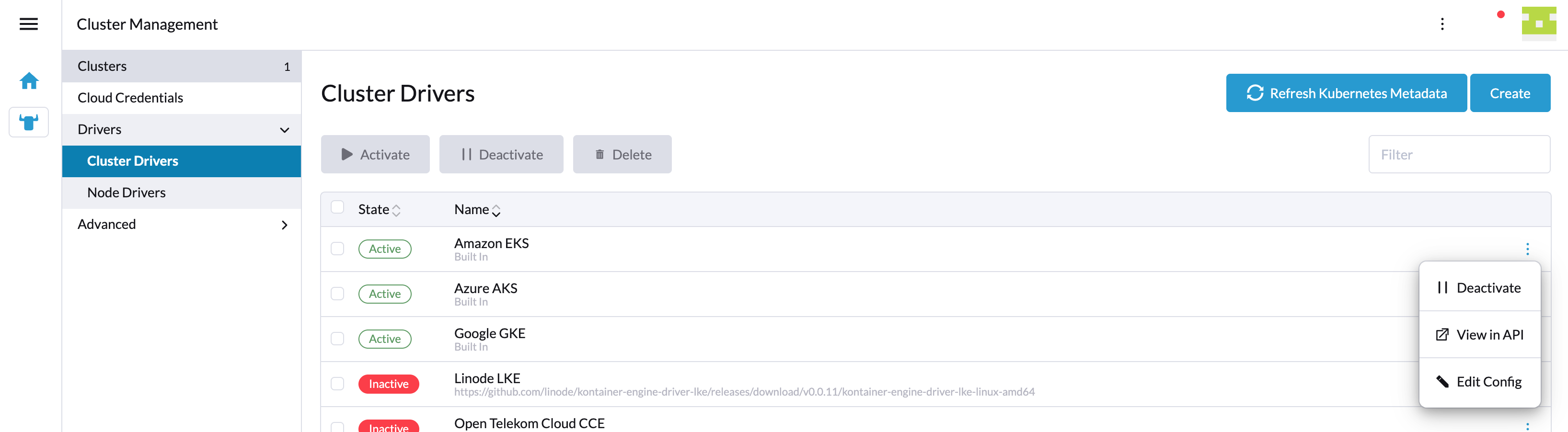
If that happens, then by default your custom Provisioner card will still appear on the Rancher UI
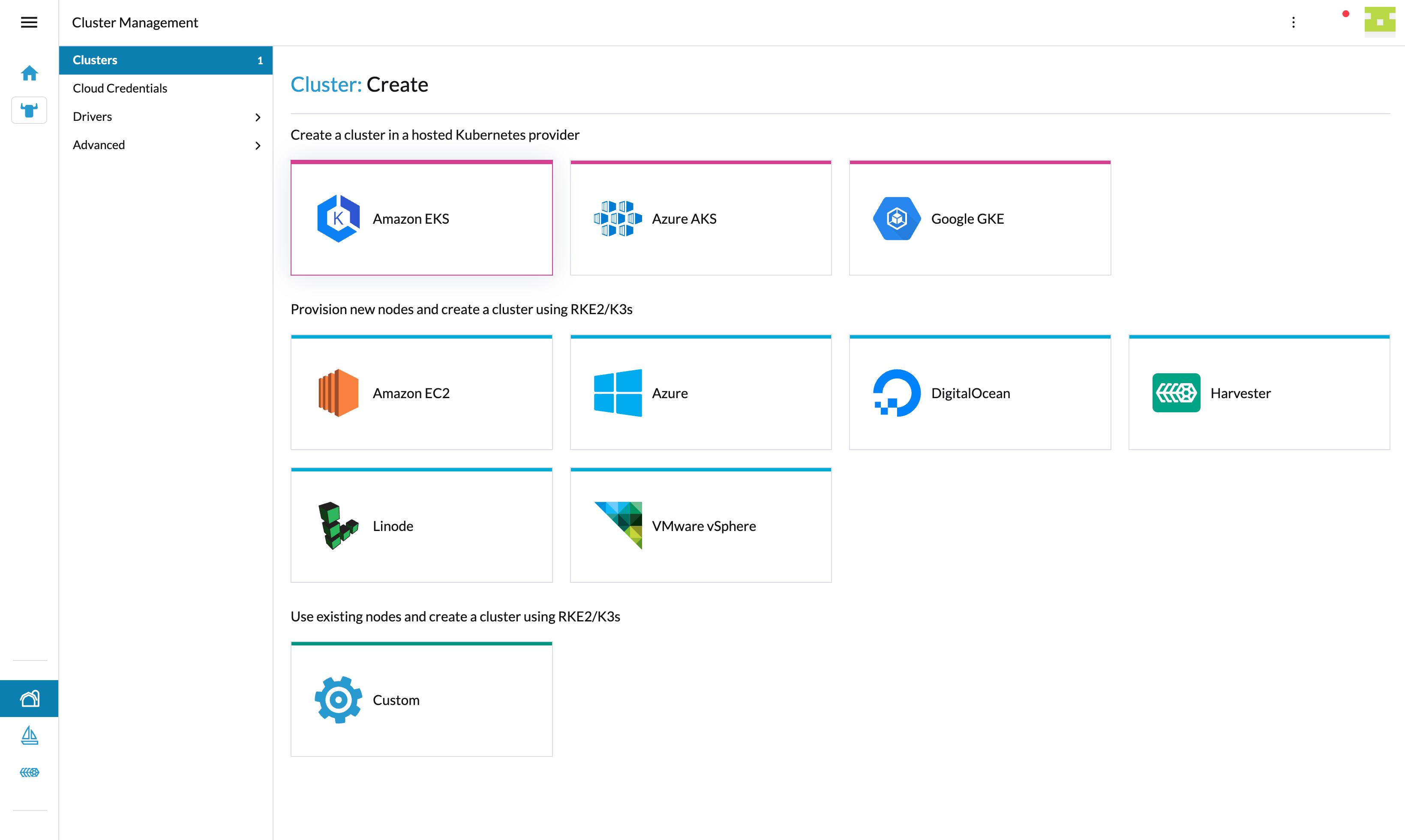
In order to hide it when the custom Provisioner is deactivated, you will need to add the following property to the Provisioner Class created before:
import { MANAGEMENT } from '@shell/config/types';

.....
export class ExampleProvisioner implements IClusterProvisioner {
  ....

  get hidden(): boolean {
    const kontainerDriver = this.context.getters['management/byId'](MANAGEMENT.KONTAINER_DRIVER, 'my-provisioner');

    return !kontainerDriver?.spec?.active;
  }
}
Hiding Hosted provider card
In Cluster Management, Providers, Hosted Providers an administrator/user (depending on permissions) can deactivate your hosted provider. This will update 'kev2-operators' setting with 'active' set to false for that provider and corresponding card will not appear inside cluster creation and import wizards.
Localization
The custom cluster type's label is defined as per any other extension text in l10n/en-us.yaml as cluster.provider.<provider name>.